How to see traffic from ChatGPT, Claude and Perplexity in your analytics
By Moha Ousaid Saaid, founder · Updated · 5 min read
Look for chatgpt.com, claude.ai, perplexity.ai and similar names in your referrer and utm_source reports, then group them into one channel. Test it with one real click from an assistant to your site. Expect an undercount, since visits from apps often arrive with no referrer and land in Direct. And don't confuse AI visitors with AI crawlers: crawlers read your pages, run no analytics script, and never appear in your visitor numbers.
Where does AI traffic show up in analytics?
In the same reports as any other traffic. When someone clicks a link in an assistant's answer, your tool sees where they came from in one of two ways:
- The referrer: the site the browser says they came from, such as
chatgpt.com. - A campaign tag: a
utm_sourcevalue on the link itself, such asutm_source=chatgpt.com.
Look in your referrer or source report for these names. It's the list our own product recognises today.
| Assistant | Referrer or utm_source |
|---|---|
| ChatGPT | chatgpt.com, chat.openai.com |
| Claude | claude.ai |
| Perplexity | perplexity.ai |
| Google Gemini | gemini.google.com |
| Microsoft Copilot | copilot.microsoft.com |
| DeepSeek | chat.deepseek.com |
| Grok | grok.com |
| Le Chat (Mistral) | chat.mistral.ai |
| Meta AI | meta.ai |
How do you test it? One real click
This takes five minutes, and it beats anything you'll read about how an assistant behaves, since that changes.
- Ask an assistant a question your site can answer, naming your business: "What does yoursite.com sell?"
- Click the link it gives you. Do this in the website and in the phone app, as they can behave differently.
- Look at your browser's address bar. Does the link carry a
utm_source? - Open your analytics' live view or today's sources. Find your visit, and note how it was labelled.
If it appears under the assistant's name, you can trust that path. If it lands in Direct, you've measured your blind spot for that app. Repeat for each assistant your customers use, and write down the date, since their links can change.
How do you group AI traffic in Google Analytics?
Google documents this in its own custom channel groups guide, with AI assistants as its example. In short: create a custom channel group, add a channel named "AI assistants", add a condition with matches regex and a pattern for the sources, then move the channel above Referrals, so it wins. Custom groups can be applied to past data too.
Google's regex is a full match by default, so the pattern must cover the whole value. Here's a narrow one to adapt, which won't catch unrelated sites whose name merely contains "ai" or "gpt":
.*(chatgpt\.com|chat\.openai\.com|claude\.ai|perplexity\.ai|gemini\.google\.com|copilot\.microsoft\.com).*Then look at the Traffic acquisition report with your new group as the dimension. Update the pattern when a new assistant matters to you. In other tools, a filter or saved segment on the same names does the job. Plausible and MetricMind report AI assistants without this step.
What will you miss?
- Visits from apps with no referrer. A native app may open your link with no referring site, and that visit counts as Direct unless the link carries a tag. That's why the phone test above matters.
- A site's referrer policy. Browsers send only the origin by default across sites, and a
no-referrerpolicy sends nothing at all. - People who copy your name. Someone reads about you in an answer, then types your address or searches for you. It's often the larger effect, and no tool can link the two. Asking new customers how they found you is still the best measure.
- Google's AI features. Google says clicks from AI Overviews and AI Mode are counted in Search Console's overall search traffic, under the Web type. In analytics they look like Google search, with no separate label.
- Crawlers. They read pages for training, search or a user's question. Most don't run JavaScript, so a browser script doesn't see them. To count them you need your server logs or a server-side helper.
Is AI traffic any good? How to judge it without fooling yourself
Compare what those visitors do with everyone else, and check the sample before you believe the gap. Here's the trap, using our demo site's 30 days.
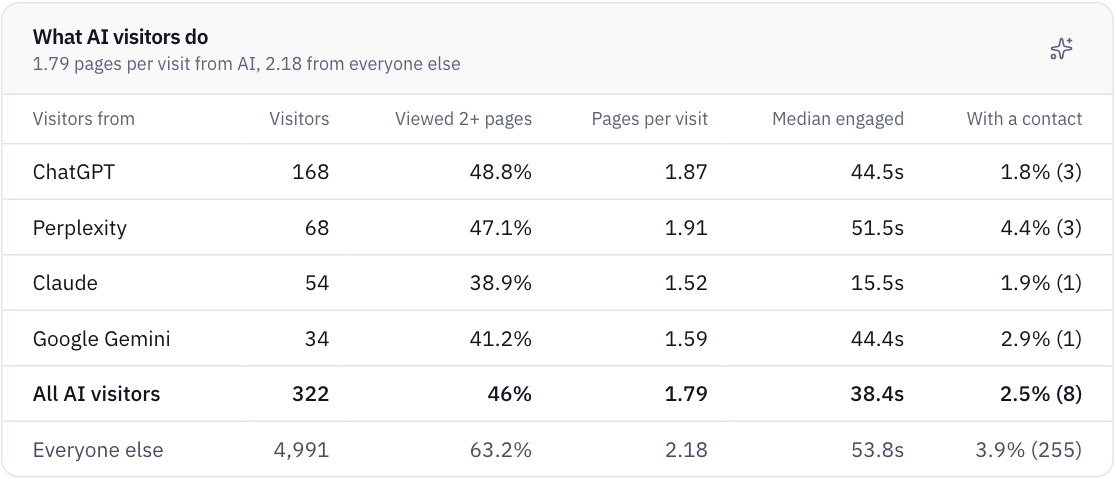
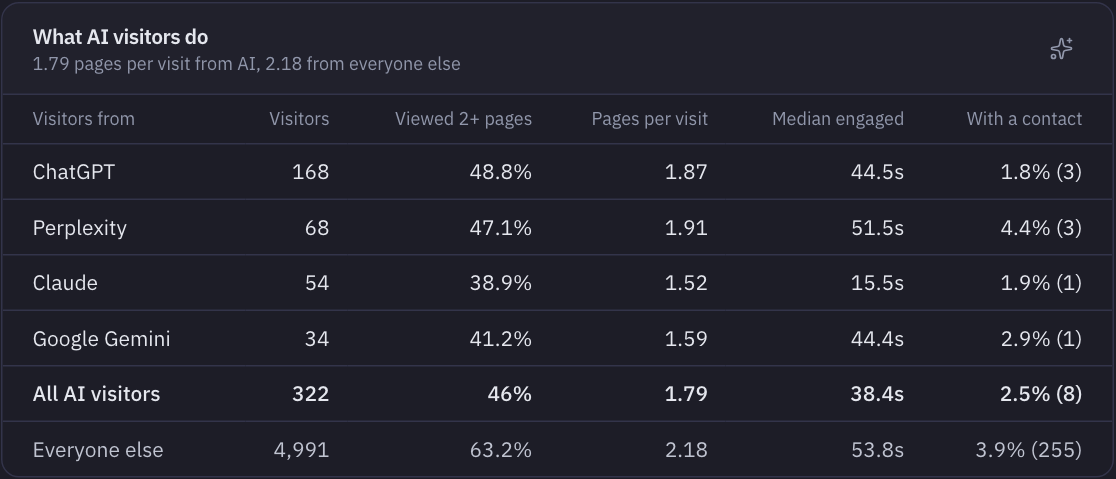
AI visitors made 8 contacts, or 2.5%. Everyone else made 3.9%, so AI traffic looks a third worse. Two things undo that conclusion:
- The groups differ. "Everyone else" includes the demo's mobile apps, which contact far more often. Compare with website visits only, and the other side drops to 2.4%. The gap disappears.
- Eight is too few. Using a standard method (a Wilson interval, which we use in our own statistics), 8 out of 322 means the real rate is probably somewhere between 1.3% and 4.8%. That range covers both 2.4% and 3.9%, so this data can't separate them.
A rule of thumb to take with you: with under about 30 contacts on the smaller side, don't draw a conclusion about AI traffic quality. Report the count, and look again next month. The same goes for each assistant on its own. Claude's 1 contact and Perplexity's 3 on the demo site say nothing about either product.
If you have your own numbers, also read what they land on. In the demo, AI visitors view fewer pages per visit than others (1.79 against 2.18). That can mean they came for one answer, which is fine if that page leads somewhere.
What if you see none at all?
It may be a small audience, or it may be that assistants can't read you. If your text only appears after JavaScript runs, or your robots.txt blocks their crawlers, they have little to cite. See why ChatGPT can't read your website, or run the free AI visibility check. No amount of tracking fixes that.
How MetricMind shortens this
- AI assistants are a channel from the first day, with no regex, on your website dashboard's sources panel.
- The AI agents page (in alpha) compares them with everyone else: pages per visit, median engaged time and contacts, per assistant. Our AI traffic page lists what's recognised.
- Crawler reads are counted by company and purpose with a small helper on your server, because they can't be seen from the browser. Crawlers that run JavaScript are counted without it.
- You can ask. "Do ChatGPT visitors contact sellers more often?" gets an answer with its query shown, and it should tell you when the numbers are too small.
Limits: we can't see what the assistant wrote about you, or how often you were mentioned without a click. No analytics tool sees that. For sources you can't classify, your numbers may differ between tools as well.
Your next step
Can assistants read your site at all?
No visits from AI may mean nothing can read you. Enter your domain to see the text crawlers get and which of them your robots.txt blocks. No sign-up.