My website gets visitors but no customers: where to look first
By The MetricMind team · Updated · 6 min read
First check that customers really are missing, since phone calls and WhatsApp messages leave no trace in most analytics. Then ask four questions in order: are these the right visitors, does the page they land on answer why they came, can they do the next thing, and is anything broken? Stop at the first answer that's no and fix that. Don't start with a redesign.
Step 1: count what counts
Many sites that look like they have no customers have customers they can't see. A visitor taps your phone number, you speak, they buy, and your analytics records a visit that led to nothing.
Pick the one or two actions that mean someone wants to do business with you: an order, a form sent, a tap on a phone, WhatsApp or email link. Count them per week. Then divide by visitors, so you have one number: actions per 100 visitors.
Ask new customers how they found you for a few weeks, too. It's crude and it catches what software misses.
Ignore industry benchmarks. A used-car marketplace and a dentist have little in common, and a figure from someone else's site won't tell you what to fix. Your own number is the baseline, and each change gets judged against it.
Step 2: are these the right visitors?
Split your actions-per-100 by traffic source. Sources often differ a lot, and this alone can end the search.
- Plenty of visitors, almost no actions, from one source. Read that source. A popular blog post brings readers, not buyers. A broad ad brings the curious. It isn't a problem with your site, and no landing page tweak will turn them around.
- A country you don't serve. Check this one early. A press mention or a cheap ad campaign can bring them.
- Visits under a second, all from one place. That's probably automated traffic. Take it out before you judge anything.
- Search visitors with no actions. In Search Console, read the queries bringing them in. People searching "what is a heat pump" are at a different stage from people searching "heat pump installer Lyon".
If one source accounts for the gap, you may have no conversion problem at all. You'd have a traffic quality problem, and the fix is in where you spend your time and budget.
Step 3: does the landing page answer why they came?
Most visitors don't start on your home page. List your top entry pages with the action rate for each, and start with the busiest one that's doing badly.
Open that page and pretend you arrived from the search or ad that brought people there. Can you tell within a few seconds what's offered, for whom, where, and at what price? Show it to someone who doesn't know your business and ask them to say it back. If they can't, you've found a cheap fix: a clearer heading costs you nothing.
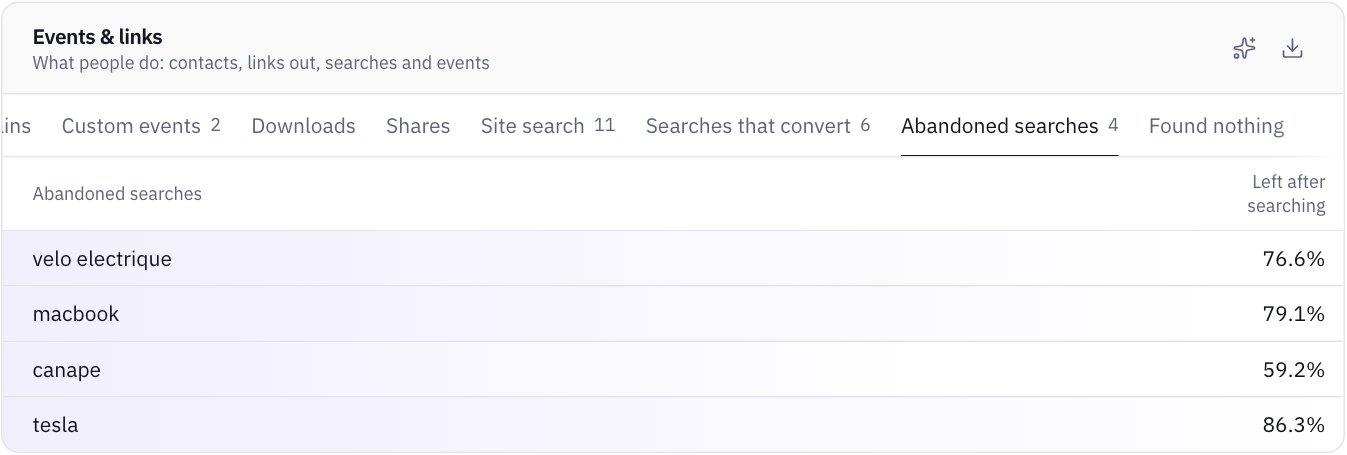
Then read your site search, if you have one. These are visitors telling you in their own words what they want. Terms that return nothing are the most useful thing on your site: either you have it and call it something else, or there's demand you aren't meeting.
Step 4: can they do the next thing?
Do it yourself, on a phone, on mobile data. Don't use your office laptop.
- Find the action. Is the phone number or the button visible without hunting? Does it work when tapped?
- Send your own form. Then see whether it arrives, and how long it takes. Check the spam folder. A contact form quietly delivering nowhere is a boring cause that costs real money.
- Count the fields. Remove each one you don't use when you reply.
- Read what they must know first. Price range, delivery area, opening hours, how long it takes. Missing answers send people elsewhere.
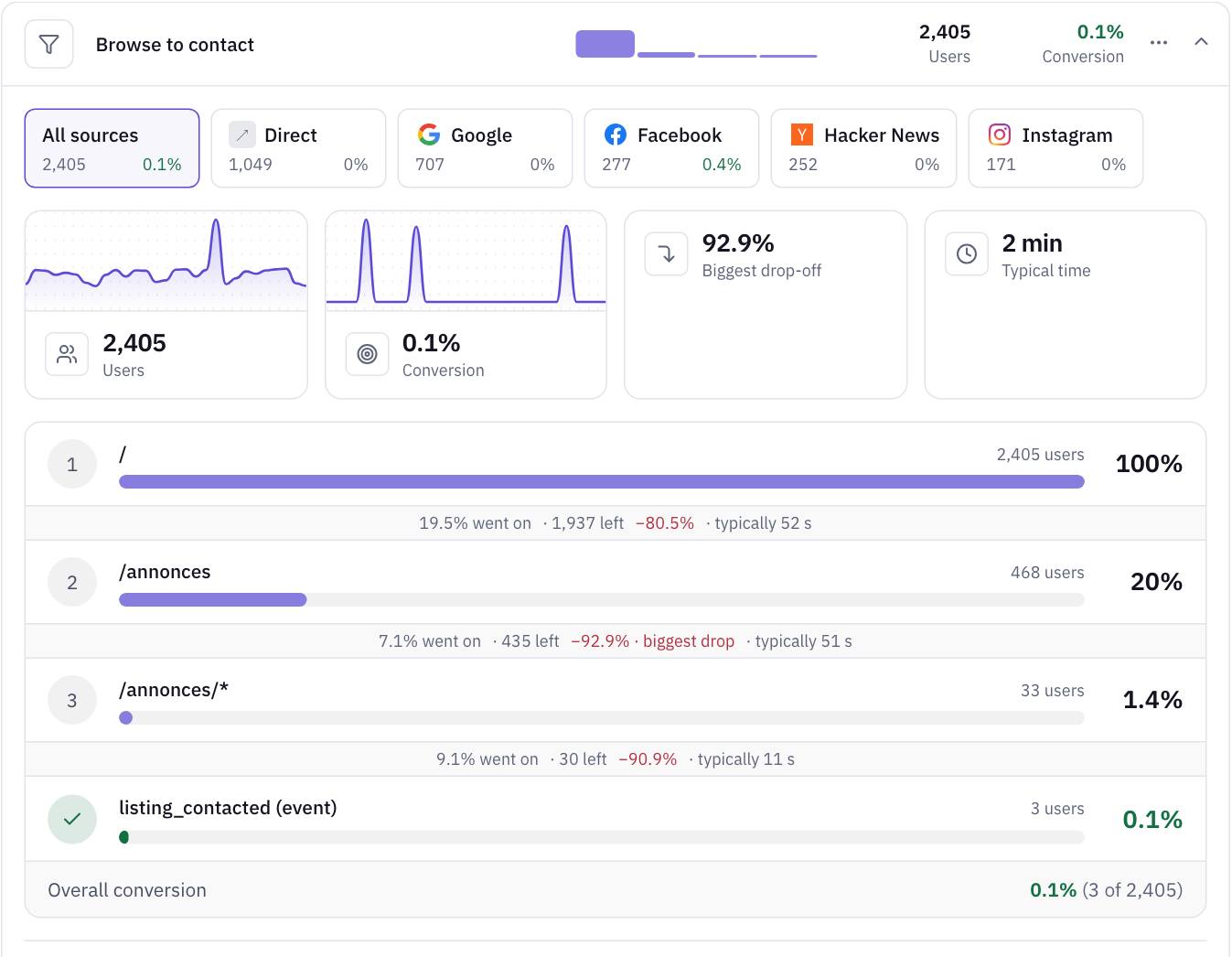
Then look at where the numbers drop. Map your path as steps, such as listing page, item page, contact, and count how many people reach each. The biggest fall tells you which page to look at first. It doesn't tell you why, but it stops you repairing pages nobody reaches.
Step 5: is anything broken?
A page can look fine to you and fail for some of your visitors. There are three signals to read.
- JavaScript errors on your key pages, especially on one browser or after a release. Your own machine won't show them.
- Repeated clicks. Someone clicking the same spot three times, or a button that does nothing, is someone stuck. It often shows you a picture that looks like a button or a link that goes nowhere.
- Speed on phones. Google's Core Web Vitals set the bar for a good experience: the main content appears within 2.5 seconds, the page responds within 200 ms, and the layout shift stays at 0.1 or less, for at least 75% of page loads. Use numbers from real visitors where you can. A score from your own connection tells you less.


Step 6: ask people
Analytics shows where people leave and rarely why. Watch a few people try to use your site, and say nothing while they do. Jakob Nielsen's much-cited article on usability testing, from 2000, argues for testing with about five people and then doing it again after you make changes. You don't need a lab. Ask a friend who fits your customer to find and buy something while you watch.
Ask customers who did buy: what nearly stopped you? Who else did you consider? The answers often have nothing to do with your site.
When none of this finds anything
If the right people arrive, understand the page, can act, and nothing's broken, the problem may not be on your website. Price, reputation, stock and competitors all stop sales, and analytics can't see any of them. It's better to learn that now than after paying for a redesign.
Change one thing, then measure
Small sites rarely have the traffic for a proper A/B test. Make one change, write down the date, and compare your actions-per-100 over the following weeks with the same number of weeks before. It won't be proof. A holiday or a new campaign can move the number too. But it's far better than remembering how things felt.
How MetricMind shortens this
Most of these steps depend on measuring things that standard analytics leaves out. In MetricMind, one script of about 12 KB collects them without code:
- Contacts: taps on phone, WhatsApp and email links, and buttons labelled like "Contact the seller". The channel only, never the number.
- Site search, including the terms that found nothing, when the results page states a count or you add one small attribute.
- Forms: started, sent and abandoned, with form and field labels only and never what people typed.
- Rage clicks, dead clicks and errors, per page, each linking to the visits behind them.
The dashboard then sorts every visit into converted, frustrated or bounced, so you see the shape of the problem at a glance. You can read any visit step by step: nothing on screen is recorded, so there's nothing to mask. Heatmaps are opt-in. When a goal has enough visitors on each side, its page also shows what leads to it. And you can ask the analyst in plain words which source converts worst, then check the query behind its answer.


It can't tell you whether your price is right. For that, go back to step 6.
Your next step
See these reports on a sample marketplace
The live demo has contacts, funnels, frustrating pages and searches that found nothing, on sample data. No sign-up.