Why people start filling in your form and don't send it
By Moha Ousaid Saaid, founder · Updated · 6 min read
People usually leave a form for one of three reasons: it asks for something they won't give yet, something on it stops working, or a field is too hard on a phone. To find out which, measure how many start and how many send, then look at the last field touched before they left. The field tells you where to look. Filling in the form yourself, on a phone, tells you why.
What should you measure on a form?
Three numbers per form: how many people started it, how many sent it, and the last field they touched before leaving. The first two give you a leave rate. The third points at the place.
"Started" needs a careful definition, because it changes your rate a lot. Google Analytics 4's enhanced measurement records form_start the first time a user interacts with a form in a session, and form_submit when they submit it. Google's page doesn't describe a report of forms left unsent or the field people stopped on. So with GA4 you can get a rough leave rate, and the field needs more work.
In our tracker a form counts as started only once someone types. Tapping into a field and moving on doesn't count. Neither does changing a dropdown or ticking a filter box, because that's often just using the page. We also leave out search boxes, and we keep sign-in forms apart, since a failed sign-in isn't a lost lead.
What does a real form report look like?
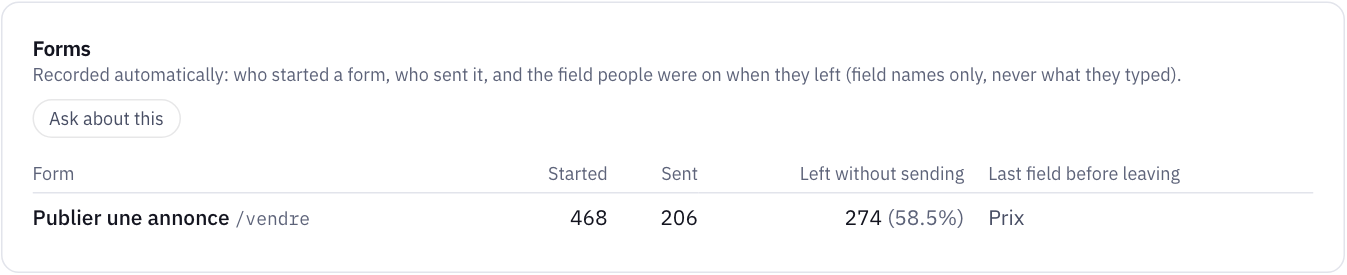
This is the sell form on our demo marketplace. Of 468 visitors who started it, 206 sent it and 274 left without sending, which is 58.5%. Sent and left add up to more than 468 because one visitor can leave on one visit and send on another.
The last field before leaving is Prix, the price. Taken alone, you might guess that people don't know what to charge. Don't stop there. Read the other reports for the same page:
- The Errors page shows a
TypeErrorreadingpriceon/vendre, 63 times in the same period. - The rage click report shows 44 visitors, 6.9% of the page's visitors, clicking the "Publier l'annonce" button again and again.
Now it reads differently. People get to the price, try to publish, and the button does nothing because the page has failed. That's a bug. A designer changing the price field's wording would have fixed nothing. This is the demo's planted problem, and it shows why a form report should be read next to errors.
What does the last field tell you?
It's the last field someone changed, which isn't always the one that stopped them. They may have read the next one and left. So look at this field and the one after it.
| Where they leave | What it usually points to | What to try |
|---|---|---|
| Phone number | They don't want a call yet, or the format is rejected | Make it optional, say why you ask, and accept spaces and a country code |
| Price, budget or quantity | They don't know the answer, or the page breaks here | Give a range or an example, and check the Errors page for this page |
| They suspect spam, or a typo gets rejected | Say what you'll send and how often | |
| First field | Second thoughts, or the form looked longer than expected | Fewer fields, and say how long it takes |
| Last field, or none in particular | The send button or the confirmation | Send it yourself. See the test below |
| A field only phones struggle with | Date pickers, dropdowns, tiny checkboxes | Compare phones against computers, then try it on a phone |
How do you test a form yourself?
Fifteen minutes, on a phone, on mobile data:
- Let autofill try. Does your browser fill the name, email and phone? Fields marked with the autocomplete attribute (
name,email,tel) save typing. The attribute tells the browser what kind of information the field expects. - Make a mistake on purpose. Leave something blank and send. Does the error appear next to the field, in words? Does what you typed survive, or do you start again?
- Check that fields have visible labels. W3C's guidance says to label every form control and notes that most users prefer or need visible labels. Grey text inside a field that vanishes on typing doesn't do that job once someone is half way down.
- Send it, then find it. See that it arrives, in which inbox, and how long it takes. Check the spam folder.
- Remove a field. For each one, ask: do you use this before replying? If not, take it out.
Is a form that says "sent" really sent?
Not necessarily, and here's a test almost nobody runs. Analytics usually records that the browser sent the form. It doesn't know whether your server accepted it or whether the email reached anyone.
So take last month's "sent" count and compare it with enquiries that actually reached you. If analytics says 40 and your inbox has 28, you have a delivery problem that no redesign will solve, and every one of those 12 people believes they've contacted you. Duplicates and test sends will cause small gaps. A big gap needs an answer this week.
When is a high leave rate fine?
Don't chase an industry figure. We haven't found a benchmark we'd trust for your kind of form, and a quote request isn't a newsletter box. Treat your own rate as the baseline, and compare each change against it.
Small numbers need care as well. With 30 starts a month, one person more or less moves your rate by more than three points. Our guide on telling a real change from a normal swing gives the rule, and how to tell if your website change helped shows how to judge a form fix afterwards.
How MetricMind shortens this
The script records forms with no setup: started, sent, left without sending and the last field, per form and page, with labels only. It reads a field's aria-label, <label>, name or placeholder, and masks long numbers in those labels. It never reads the value.
- The report sits on the Events page, with its leave rate and last field, and each form left unsent also marks that visit as frustrated.
- You can read a visit step by step on the Sessions page, including the form left unsent, the errors and the clicks around it. Nothing on screen is recorded, so it won't show you what the person saw.
- A form sent counts as a converted visit, next to contacts, so you don't have to set up a goal first.
- Ask the analyst which form loses most people and what else happens on that page, and it shows the query behind its answer. Questions come with every plan, with a monthly allowance. Written investigations start with Pro.
Two limits. A form sent with JavaScript counts when its submit button is clicked and the form is valid, so a server failure after that looks like a send. And a form with a password stays in the report, but is neither a conversion nor a frustration. Read about forms in MetricMind. If your enquiries come by phone as well, see how to count calls and WhatsApp messages.
Your next step
See a form report on sample data
The live demo shows who started a form, who sent it and the field they left on, next to the errors and clicks on the same page. No sign-up.