What are rage clicks and dead clicks, and what should you do about them?
By Moha Ousaid Saaid, founder · Updated · 5 min read
A rage click is someone clicking the same spot several times in quick succession, because nothing seems to happen. A dead click is a click on a button or link that gets no response at all. Both point at a place where your site let somebody down, usually a broken control or something that only looks clickable. Find them per page, then fix the ones on the pages that lead to a contact or a sale.
What exactly counts as a rage click?
There's no standard. Each tool sets its own rule. Microsoft Clarity's documentation defines a rage click as someone clicking multiple times in a clustered area in rapid succession, and a dead click as a click with no feedback in a reasonable amount of time, with no numbers given. So a figure from one tool won't compare with a figure from another.
Here's ours, taken from our tracker's code, so you know precisely what you're reading:
| Question | Rage click | Dead click |
|---|---|---|
| What must happen | 3 clicks within 1 second and 30 pixels, on the same element | A click on a button or link, then nothing |
| What "nothing" means | The page didn't change between the clicks | No page change, scroll, navigation or focus loss before the next click |
| How long we wait | 1 second | 1.5 seconds, or 5 seconds for a link to another page |
| Left out | Form fields, sliders, text being selected | Phone, WhatsApp and email links, downloads, links that open a new tab |
| Limit | Once per burst | 10 per page |
The exclusions matter. Without them you get a lot of false alarms: people triple-click to select a paragraph, step a quantity up, or swipe through a carousel. A button that reacts each time is doing its job, so any change on the page starts the count again. A tap on a phone link rightly shows nothing on the page, because the phone takes over.
What do rage and dead clicks usually mean?
| What you see | Likely cause | What to do |
|---|---|---|
| Rage clicks on a real button, with errors on the same page | The button's code has failed | Fix the error. This one is a bug |
| Rage clicks on an image or plain text | It looks clickable | Make it do what people expect, such as enlarge, or stop it looking clickable |
| Rage clicks on a real button with no error | It works but it's slow, with no sign of progress | Show progress at once, and turn the button off while it runs |
| Dead clicks on a link or button | It does nothing, or does something too quiet to see | Click it yourself, on a phone, then fix it or give feedback |
| Dead clicks on one browser only | That browser fails where others work | Test on that browser. Your own machine won't show it |
None of these is a verdict. A count tells you where to look.
How can you find these without any tool?
Here's a test that takes 10 minutes and finds a surprising amount:
- Open your busiest three pages on a phone, on mobile data. Those usually are your home page, a listing or product page, and your contact page.
- Tap everything that looks tappable: images, card corners, prices, icons and underlined words.
- Count to one and a half after each tap. If nothing moves, write it down.
- Now do the page's main job. Add to cart, reveal the number, send the form. Tap once and wait.
- Open the browser's console on a computer and do the same. Red text after a click is the reason for many dead buttons.
That finds the obvious ones. It won't find what fails for one browser, one country or one slow connection, and that's what measurement adds.
What does this look like in real numbers?
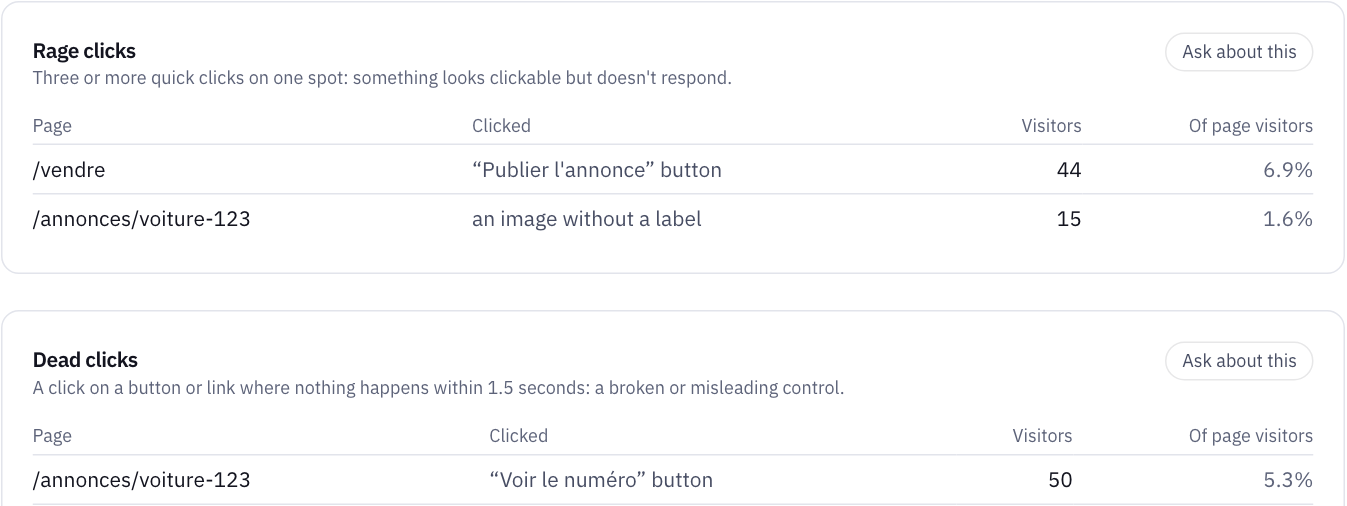
Three rows on our demo marketplace, three different fixes:
- "Publier l'annonce" on /vendre: 44 visitors, 6.9% of the page's visitors. The Errors page shows 63
TypeErrors on the same page, and the sell form loses most people at the price field. That's a bug, and it's costing listings. Fix it first. - "Voir le numéro" on the item page: 50 visitors, 5.3%, as dead clicks. This button reveals a seller's phone number, so every dead click may be a lost contact. On a marketplace, it's second only to a broken sell form.
- An unlabelled image on the item page: 15 visitors, 1.6%. People want a bigger photo. It's a smaller problem, and it's a cheap change.
That ordering follows a rule you can reuse: what is the click trying to do, and how close is that to money? Then share of the page's visitors, then the count. We don't publish a "normal" rate, because we haven't seen evidence for one that holds across sites. Compare a page with itself over time.
Do you need session replay to fix these?
Often you don't. A recording shows you the click, but the label, page and any error tell you the cause in most of the cases above. Replay also raises questions about what gets recorded, and you'd have to mask what visitors type and see.
It does cost you something. Without video you can't see what someone was looking at, and an odd layout on one phone won't reveal itself. For that, watch a few people use your site, as described in our guide to visitors who don't become customers.
How MetricMind shortens this
The script detects both with no setup, and sends a label for what was clicked, not the page's contents. Add data-mm-ignore to a control that's meant to do nothing visible, so it isn't counted as dead.
- Frustrating pages on the Website dashboard rank pages by rage clicks, dead clicks and errors, with the visitors affected. Pick a row to read the visits behind it.
- The Errors page lists each clicked element with its share of the page's visitors.
- Sessions show any visit step by step, rebuilt from events. Nothing on screen is recorded, so there's nothing to mask.
- Heatmaps come down to one attribute in your script, part of the install code for new websites, and they show a coarse grid of clicks, never text.
- A rise gets flagged. Frustrated visits, which also include forms left unsent and errors visitors could notice, are part of the same daily checks as traffic. Alerts come with every plan.
One limit worth knowing: a click that changes something on the page doesn't count, even when the change isn't what someone wanted. An error message that appears three times reads as a response. If forms are your problem, go to why people don't send your form. Read more on frustrating pages.
Your next step
Open the frustrating pages on a sample site
The live demo lists rage clicks, dead clicks and errors by page, each linked to the visits behind them. No sign-up.