Which ads bring customers, not just clicks?
By Moha Ousaid Saaid, founder · Updated · 5 min read
To see which ads bring customers, tag every ad link with its campaign, count contacts or sales per campaign in your own analytics, and divide what you spent by that count. Clicks tell you who paid attention. Cost per contact tells you which ad to keep. Then wait for at least five contacts on each side before you move money, because below that the difference is usually luck.
Why can't you rely on the ad platform's own numbers?
You can use them for spend, and that's the number only they have. For results, each platform counts what it can see, under its own attribution rules. Its figures rarely match your analytics, and it has an interest in the answer. Keep one neutral record of what visitors did on your site, and read every campaign through it.
If your customers call or message you, this matters more. The ad platform doesn't know a WhatsApp chat came from its click unless you've set up measurement for it. Count your calls and WhatsApp taps first, or you'll judge ads on forms alone.
How do you tag ad links so you can tell campaigns apart?
Use UTM parameters on each ad's address. Google's guide treats utm_source, utm_medium and utm_campaign as the ones to always set, and utm_content for telling apart creatives or links in one campaign:
https://yoursite.com/offer?utm_source=facebook&utm_medium=paid_social
&utm_campaign=winter-sale&utm_content=video-a- Use lowercase and one spelling.
Facebookandfacebookcan end up as two rows, depending on your tool. - Say it's paid in
utm_medium. Usecpcfor search andpaid_socialfor social. Otherwise your paid and unpaid Facebook traffic land in one pile. - Test before you spend. Open the tagged link, and confirm the visit shows up under that campaign.
Google Ads has another way in. Auto-tagging adds a click ID called GCLID to the address. That ID is what Google's own reports read. Your other tools may only see that a Google ad was clicked, without the campaign, unless you add UTM tags as well.
How do you know whether a Facebook visit came from an ad?
A click ID alone won't tell you. Here's a test you can run in a minute: click a link in an ordinary, unpaid Facebook post, and look at the address that opens. You'll generally see fbclid added to it. So fbclid doesn't mean paid, and a tool that treats it as paid will flatter your ads with your free posts.
This is how our software reads each signal. You can use the same logic to judge any report:
| On the address | We read it as | Why |
|---|---|---|
gclid, gbraid, wbraid | Paid search, Google | Added for Google ads |
msclkid | Paid search, Microsoft | Added for Microsoft ads |
ttclid, twclid, li_fat_id | Paid social | TikTok, X and LinkedIn ad clicks |
fbclid | Facebook, not paid by itself | It also appears on unpaid links |
utm_medium of cpc, ppc, paid, paid_social, display and similar | Paid, or Display | You said so. That's why you tag Meta ads |
We keep the network's name and never store the click ID itself.
What should you divide by what?
Build one table a month, per campaign: spend, visitors, contacts or sales, contacts per 100 visitors, and spend divided by contacts. The last number is the one you act on. A campaign with a low contact rate can still be your cheapest, if its clicks are cheap.
If you sell online, use revenue instead of contacts, and subtract refunds. For leads that close weeks later, ask your sales records which campaigns the eventual buyers came from, every few months. A campaign can be cheap per enquiry and useless per sale.
When is the difference big enough to act on?
Most small ad accounts decide far too early. Our analyst's significance test says "too few to tell" when either side has under 5 contacts or under 30 visits, and it won't call a result below that. Once past that, it runs a standard test on the two rates.
Look at the demo marketplace. This site runs no ads, but the sums work the same on any source.
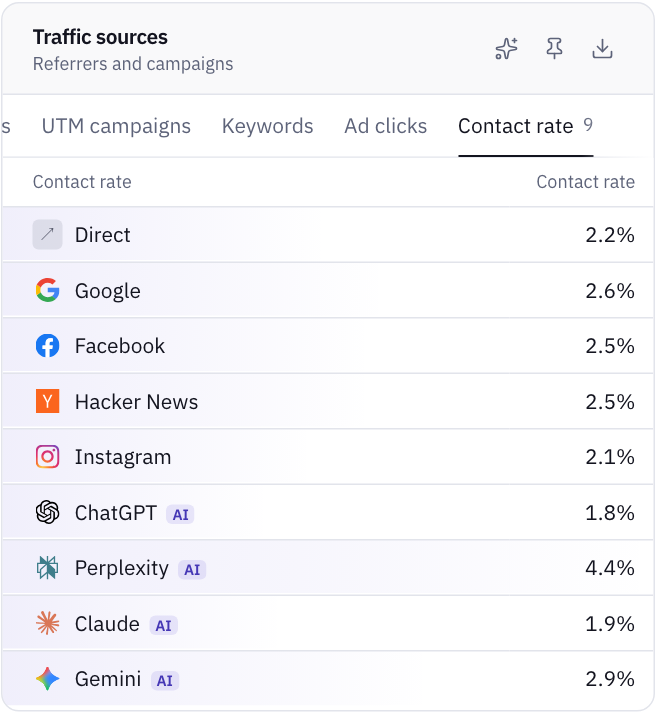
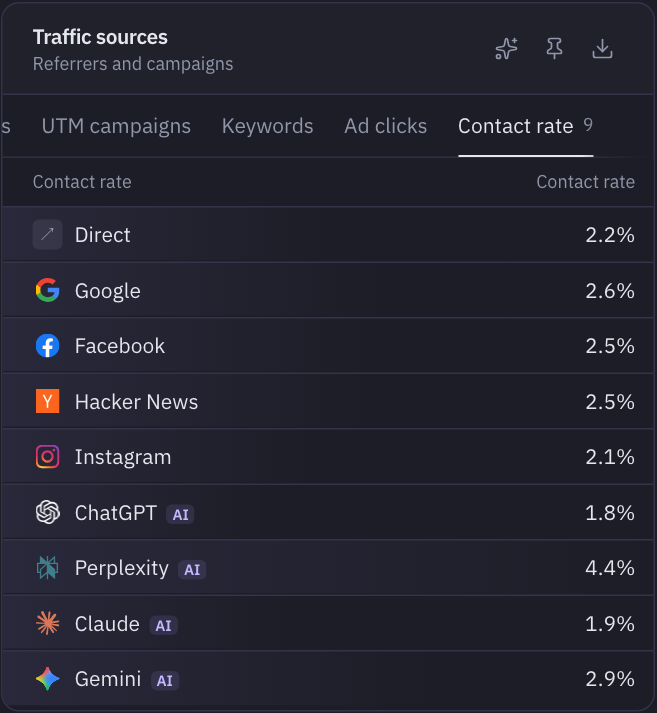
Perplexity looks like the clear winner at 4.4%, well above Google's 2.6%. If those were ads, you might move your budget there tomorrow. But Perplexity sent 68 visitors in the period, so 4.4% is about three contacts. That's under five. One more or one fewer contact would swing the rate by over a point. Google, with 1,207 visitors, deserves far more trust at 2.6%.
| What you have | What to do |
|---|---|
| Under 5 contacts on either campaign | Nothing yet, unless spend is hurting. Let it run or stop on budget, not on results |
| 5 or more each, and the test says "could easily be chance" | Treat them as equal. Keep the cheaper one, or test a bigger difference |
| The test says "probably real" or better | Shift budget in steps. Check again after the next month |
| No contacts after spending more than a contact is worth to you | Stop it. You don't need statistics to stop a clear loss |
The last row is the important one. The numbers protect you from false winners. They don't oblige you to keep paying while you wait for proof. For the sums, use the worked example in how to tell if a change helped.
What do people get wrong when reading ad results?
- Comparing clicks with visitors. They won't match. Some people click and never finish loading the page. Others block your tracker. Compare the trend, not the digit.
- Crediting only the first visit, or only the last. A person may click your ad on Monday and come back by typing your name on Thursday. The tool has to credit one of them. Know which.
- Judging a landing page by an ad's traffic. A broad ad brings the curious. Fix the targeting before you redesign the page.
- Forgetting the rest of the funnel. If contacts fell on every source at once, your ads may be fine and your contact button may be broken.
How MetricMind shortens this
Contacts count by themselves, so your ad results don't depend on setting up conversion tags.
- Traffic sources has tabs for channels, sources, UTM sources, mediums, campaigns, keywords and ad clicks by network, plus contact rate per source. Tagged links are sorted into Paid search, Paid social, Display and others.
- Ask whether a difference is real. The analyst runs that significance test on two rates and gives you a plain verdict. Questions come with every plan, with a monthly allowance.
- Goals show conversions per campaign, and revenue by source and campaign comes from Stripe, Paddle or a call from your page. A Shopify pixel is in beta.
Know three limits before you rely on it. It doesn't import your ad spend, so the cost column comes from you. It credits each visit to where that visit started, so a person's second visit, typed in directly, counts as Direct. And it doesn't replace Google Ads conversion tracking or audiences, so if your bidding depends on those, keep them. See sources and campaigns. If you spend nothing on ads yet, AI assistants may be the source worth measuring first.
Your next step
See contact rate per source on sample data
The live demo shows visitors and contact rate for each source. Its data has no paid campaigns, so look at the method, then try it on your own site. No sign-up.